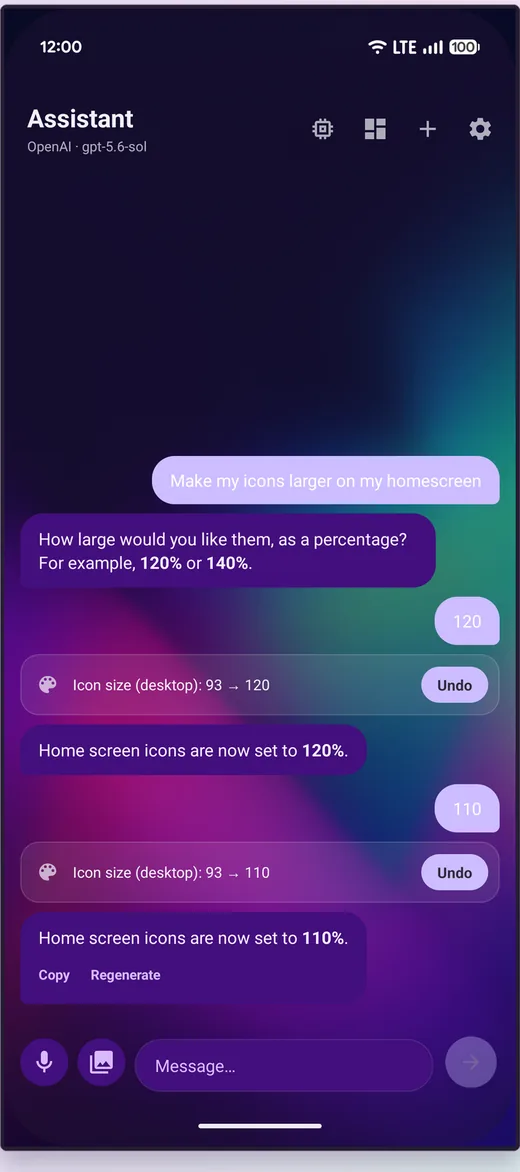
Say it in plain words — "make my icons squares", "4x6 grid", "hide these apps", "set up a Bedtime space" — and Meridian applies it.
It shows its work
Every change comes back as a list, old value to new value, with Undo beside it. Nothing happens invisibly, and nothing is a one-way door. If it edits a Space, it tells you which Space it edited — it always works on the one you are looking at.
What it can actually do
- Build drawer tabs and sort apps into them
- Apply icon packs, shapes and sizes
- Assign gestures, including drawn shapes
- Place and resize widgets
- Create whole Spaces, with schedules, triggers, dock and switcher
- Write a backup file
It is held to the same validation rules as the settings screens themselves, so it cannot set a value the app would reject. An assistant that can put your launcher into an impossible state is worse than no assistant.
Ask from a gesture
Save a question to a swipe or a drawn shape and answer it without opening anything — draw a W for the weather, swipe two fingers down for whatever you ask most. See gestures.
Bring your own key, or run it on your own hardware
The assistant is off until you add an API key. No key, no network traffic — the feature simply does not run. When you do add one, your messages go directly from your phone to the provider you chose and nowhere else. There is no Meridian server in the path, because there is no Meridian server.
Presets exist for OpenAI, Anthropic, Gemini, DeepSeek, Groq, Mistral, OpenRouter, Perplexity, Moonshot's Kimi, Grok and any other OpenAI-compatible endpoint. For complete privacy, point it at Ollama on your own network and nothing leaves the house.
You pay the provider directly. Meridian takes no cut and adds no markup, and for what a launcher assistant does the small fast models are the sweet spot — normal daily use lands in pennies per month, and Google's free Gemini Flash tier covers it outright for many people.
AI models and what they cost
The assistant works with any OpenAI-compatible provider, and for what a launcher assistant does — quick answers, settings changes, building a Space — the small, fast models are the sweet spot. You bring your own API key and pay the provider directly; Meridian takes no cut and adds no markup. Images below means you can attach screenshots and photos to your chats.
General usage: GPT-5.6 Luna (OpenAI)
The preset Meridian starts with: quick, works well with tools, and
cheap — $0.20 per million input tokens, $1.20 per million output. Typical daily
assistant use works out to pennies a month. Handles images.
Add funds: platform.openai.com → Billing.
Free option: Gemini 3.7 Flash (Google)
Google's API has a genuinely free tier for its Flash models within
generous rate limits — the trade-off is that Google may use free-tier conversations
to improve its products. If that bothers you, the paid rate is $0.75 / $3.75 per
million tokens. Handles images.
Get a key (and upgrade to paid if you want):
aistudio.google.com.
Cheapest paid: Qwen 3.7 Flash (Alibaba)
Absurdly cheap at $0.03 / $0.13 per million tokens — the lowest paid
rate going — and it still handles images and even video. In Meridian, use a custom
endpoint with base URL
https://dashscope-intl.aliyuncs.com/compatible-mode/v1.
Key and funds: Alibaba Cloud Model Studio.
New and multimodal: GLM-5.3-Flash (Z.ai)
Zhipu's brand-new flash model: natively multimodal (images), a huge
context window, and $0.15 / $0.50 per million list price — currently half that on a
launch promo. OpenAI-compatible API.
Key and funds: z.ai/model-api.
Cheap and capable: DeepSeek V4 Flash
DeepSeek's fast model punches above its price; V4 Pro is the step up
at roughly $0.66 / $1.98 per million off-peak (peak hours cost double). Either keeps
normal use well under a dollar a month. Text only — no image input.
Add funds: platform.deepseek.com → Top up.
Completely private: Ollama on your own hardware
Run a model on your own computer with Ollama and point Meridian at it
over your network. Free, no API key, and nothing ever leaves your house — the
trade-off is you need a machine capable of running a decent local model. Image support
depends on the model you pick.
Get it: ollama.com.
Meridian also has presets for Moonshot's Kimi (platform.moonshot.ai, from about $0.60 / $3.00 per million), Grok, Mistral, Groq, OpenRouter and more. Bigger models work too; they are just overkill for a launcher.